

Do you need documentation for this product (installation, configuration, and programming)?
Do you need a direct management contact for large orders?
Do you need help with this product? Contact us


Share this product


Shipping
Shipping in 5-10 business days
Description
REMOTE CONTROL
BENINCA
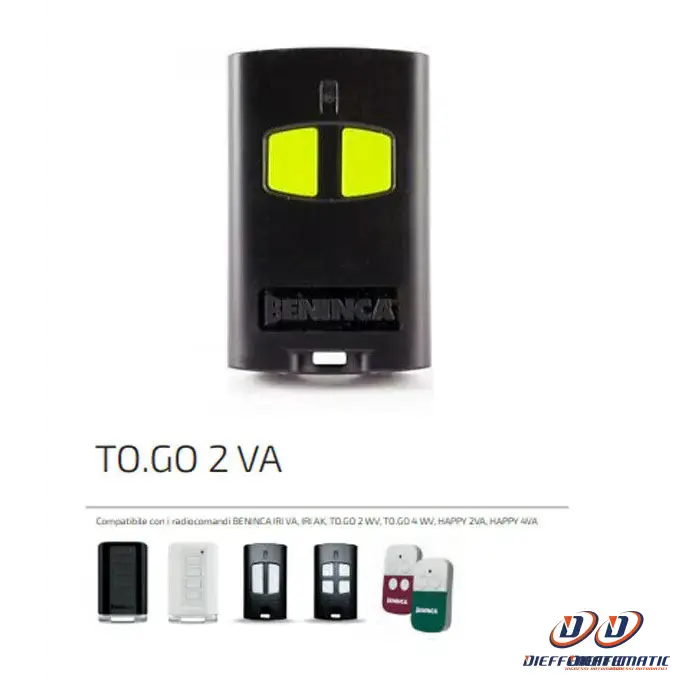
TO.GO 2 VA
Benincà TOGO2VA gate remote control, 2 buttons (2-channel),
433.92 MHz frequency, ARC (Advanced Rolling Code).
The new ARC coding represents the evolution of the existing rolling code.
Thanks to the length of the transmitted code, ADVANCED ROLLING CODE coding
(128-bit compared with the current 64-bit) ensures an absolute level of security.
Remote control: Benincà TOGO2VA model
Number of buttons: 2
Button color: yellow.
Housing color: Gray
Frequency: 433.92 MHz - ARC (Advanced Rolling Code)
Coding: On self-learning radio card.
The remote control is supplied with 128-bit coding.
To change the coding type, press buttons 1 and 2 simultaneously for 20 seconds.
After a few seconds, the LED starts flashing to indicate the mode about to be activated:
2 flashes and a 1-second pause:
the transmitter is about to be configured as HCS
3 flashes and a 1-second pause:
the transmitter is about to be configured as ARC
when the LED lights up steadily, the transmitter has changed mode.
After a few seconds, the LED starts flashing to indicate the mode about to be activated:
2 flashes and a 1-second pause:
the transmitter is about to be configured as HCS
3 flashes and a 1-second pause:
the transmitter is about to be configured as ARC
when the LED lights up steadily, the transmitter has changed mode.
Remote Learning in One WB/WI Receivers
The procedure must be carried out near the receiver.
• Press the hidden button on the stored transmitter, i.e. press buttons T1 and T2 simultaneously
buttons T1 and T2 for 3 seconds (the transmitter's red LED starts flashing)
• Within 5 seconds, press the button on the transmitter already stored that corresponds to the channel
to be paired with the new transmitter.
• Within 5 seconds, press the button on the new transmitter to be assigned to the selected channel.
• The receiver exits programming mode. Check that the new transmitter is working correctly.
transmitter has been stored.
The procedure must be carried out near the receiver.
• Press the hidden button on the stored transmitter, i.e. press buttons T1 and T2 simultaneously
buttons T1 and T2 for 3 seconds (the transmitter's red LED starts flashing)
• Within 5 seconds, press the button on the transmitter already stored that corresponds to the channel
to be paired with the new transmitter.
• Within 5 seconds, press the button on the new transmitter to be assigned to the selected channel.
• The receiver exits programming mode. Check that the new transmitter is working correctly.
transmitter has been stored.
Remote Learning in Receivers Built into Control Units
The procedure must be carried out near the receiver.
• Press the hidden button on the stored transmitter (the transmitter's red LED
starts flashing)
• Within 5 seconds, press the button on the transmitter already stored that corresponds to the channel
to be paired with the new transmitter.
• Press the hidden button on the transmitter to be stored (the transmitter's red LED
starts flashing)
• Within 5 seconds, press the button on the new transmitter to be assigned to the selected channel.
• The receiver exits programming mode. Check that the new transmitter is working correctly.
transmitter has been stored.
The procedure must be carried out near the receiver.
• Press the hidden button on the stored transmitter (the transmitter's red LED
starts flashing)
• Within 5 seconds, press the button on the transmitter already stored that corresponds to the channel
to be paired with the new transmitter.
• Press the hidden button on the transmitter to be stored (the transmitter's red LED
starts flashing)
• Within 5 seconds, press the button on the new transmitter to be assigned to the selected channel.
• The receiver exits programming mode. Check that the new transmitter is working correctly.
transmitter has been stored.
24-month warranty
eb: 372685001966
