





Shipping
Shipping in 5-10 business days
Description
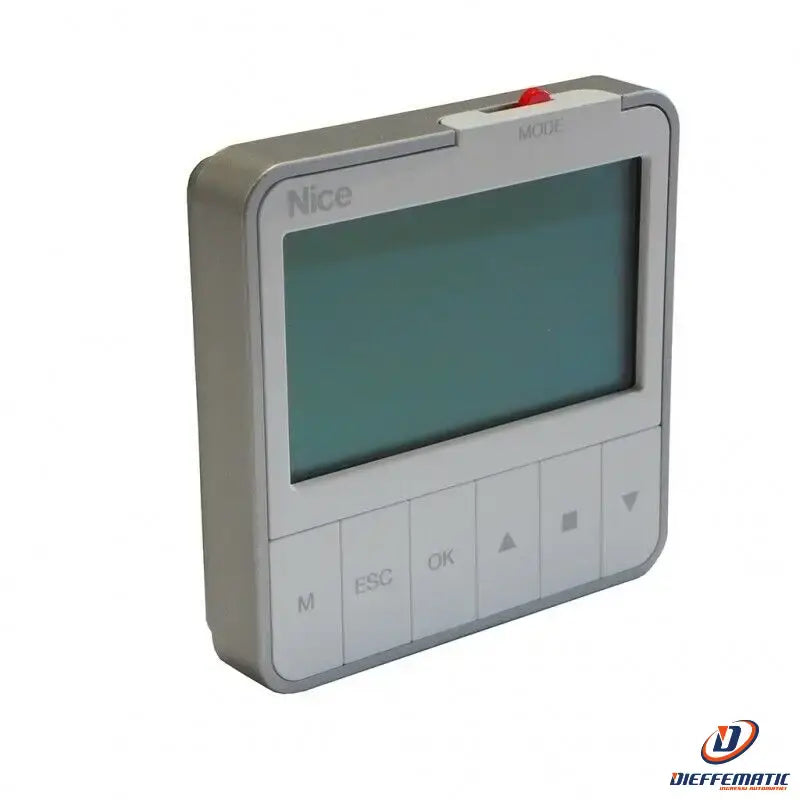
Radio-controlled wall-mounted time programmer with LCD graphic display. Battery-powered and controls 1 radio channel
Mod. Era Krono
Intuitive programming
Simple configuration of device parameters
and event programming thanks to the intuitive
navigation menu, practical selection buttons
and large display.
Easy to use
The cursor positioned at the top of the
programmer allows users to switch easily and
quickly between different operating modes.
The LCD graphic display allows users to view
the relevant parameters at any time
(date, time, movement, status and functions).
Secure
Option to set a PIN to access
"Programming" mode, preventing accidental changes
to the set parameters. In addition, when
the transmitter is in "Manual" mode,
the keypad can be locked to prevent
unauthorized people from using the device.
Maximum customization
Individual event parameters can be changed
without deleting and recreating them.
Events can be easily duplicated,
making it quicker to create new scenarios
that differ by only a few variables.
Users can temporarily disable selected events
and re-enable them later.
Long range
200 m in open space, 25 m indoors.
Ergonomic, ultra-slim design that's easy
to install. Simple wall mounting with
a practical retractable bracket. Standard dimensions
compared with common two-module wall mounts.
3 DIFFERENT OPERATING MODES
"Automatic": Automatically runs scheduled events at the preset times.
"Manual": Allows Era Krono to be used as a transmitter, sending commands to raise, stop and lower.
"Holiday": Randomly runs scheduled events to simulate someone being at home
while away, deterring attempted break-ins.
Astronomical clock
Automatically adjusts to changing sunrise and sunset times by simply selecting
the nearest city: you can wake up with the right amount of light, and lower the shutters or raise the awnings
at sunset all year round without having to reprogram the event.
Memo Group:
allows you to control up to 6 groups of automation systems simultaneously or independently, with the
option to assign different functions to certain motors; for example, you can activate the "astronomical clock" function
only for the shutters in the sleeping area and the "holiday" function for openings facing the street.
Climate sensor On/Off
activates or deactivates climate sensor operation, allowing you to choose which automation systems connected
to the sensors should respond to changing weather conditions.
